Description
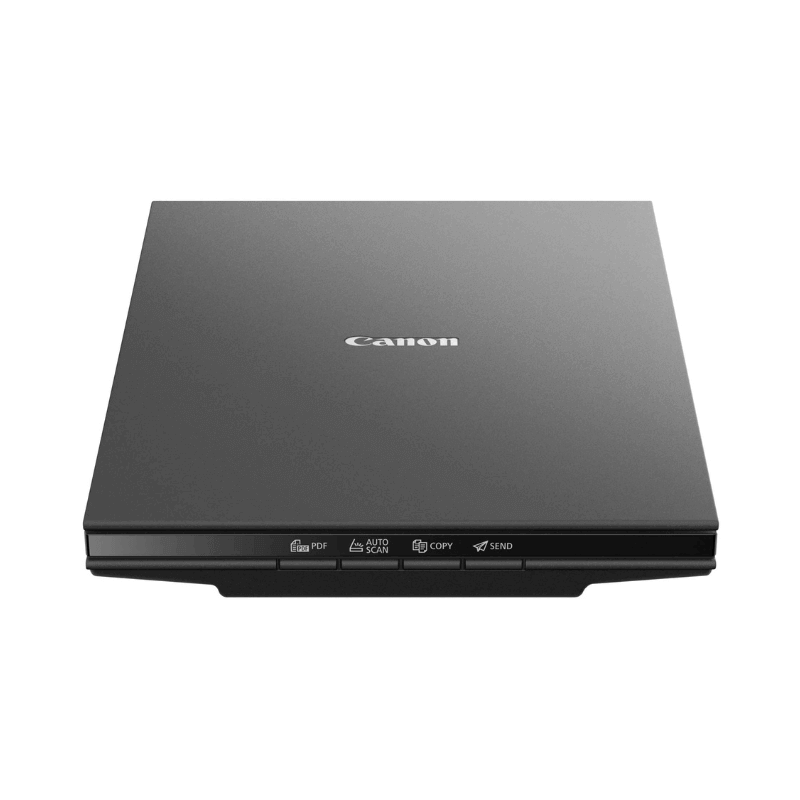
The Canon CanoScan LiDE 300 is a slim A4 flatbed scanner that takes its power from the USB cable, so there is no adapter and no second plug to find. At 2400 x 2400 dpi optical resolution it handles both office documents and photographs properly, and its four one-touch buttons mean you can scan straight to PDF without opening any software first.
What it works with
The LiDE 300 connects over USB to Windows and macOS computers using Canon's IJ Scan Utility and ScanGear TWAIN driver. Canon supplies the cable, and it should go into a USB 3.0 or higher port on your computer for full performance — the scanner draws all its power through that connection, so a low-powered or unpowered hub can cause it to fail mid-scan.
It scans up to A4 or Letter size, which covers ordinary documents, certificates, ID pages, receipts and standard photo prints. It is a flatbed with no automatic document feeder, so pages go on the glass one at a time. If you need to scan a stack of fifty pages regularly, ask us about a document scanner with a feeder instead — this is the wrong tool for that job and we would rather say so.
The Z-lid expansion top lifts to accommodate thicker items, which means you can scan a page from a bound book without cracking the spine.
Specifications
| Field | Value |
|---|---|
| Scanner type | Flatbed, Contact Image Sensor (CIS) |
| Optical resolution | 2400 x 2400 dpi |
| Selectable resolution | 25 – 19,200 dpi |
| Colour depth | 48-bit input / 24-bit output |
| Maximum document size | A4 / Letter, 216 x 297 mm |
| Scan speed | Approx. 10 seconds for A4 colour at 300 dpi |
| Interface | USB Mini-B, powered by USB |
| Power consumption | Approx. 4.5W in use, 0.3W standby |
| Dimensions | Approx. 250 x 367 x 42 mm |
| Weight | Approx. 1.7 kg |
| Part number | 2995C002 / 2995C003 |
Who this is for
Offices, cyber cafés, schools and home users who need clean digital copies of documents and photographs. It is also a sensible buy for anyone who already has a printer and simply needs scanning added, rather than replacing a working printer with an all-in-one.
Why buy from Trinatech
- Stock held in Nairobi CBD — walk in and collect.
- Delivery across Kenya including Kisumu, Nakuru, Eldoret and Mombasa.
- M-Pesa and bank transfer accepted.
- Order over WhatsApp, or visit The One Mall, River Road.
Getting the most from this scanner
Clean the glass with a dry microfibre cloth before an important scan — dust shows up as specks on every page and is the most common reason people think a scanner has a fault. Scan documents at 300 dpi, not 2400; higher resolution only makes sense for photographs you intend to enlarge, and at 2400 dpi a single page becomes a very large file for no visible gain. Use the PDF button for multi-page documents so pages land in one file rather than a folder of images. Because it runs on USB power alone, plug it directly into the computer rather than through a hub.
Frequently asked questions
- Does it need a power adapter? No. It draws power from the USB cable, which is one of its main advantages.
- Can it scan to PDF? Yes, using the dedicated PDF button, and Canon's software can make the text searchable with OCR.
- Does it work with a Mac? Yes. Download the current driver from Canon's support site for your macOS version.
- Can it scan a whole book? It can scan pages from a book — the lid lifts to sit over the spine — but one page at a time.
- Do you deliver outside Nairobi? Yes — Kisumu, Nakuru, Eldoret, Mombasa and countrywide.